Page 1 of 2
SaveBrush() - artefacts
Posted: Tue Jul 24, 2018 11:36 am
by lazi
The script and the result:
Code: Select all
EnableLayers
SetFont(#SANS,20)
SetFontStyle(#NORMAL)

CreateTextObject(1,"Hollywood")
DisplayTextObject(1,#CENTER,#CENTER,{name="font"})

ConvertToBrush(#LAYER,"font",1)
DisplayBrush(1,0,0)

SaveBrush(1,"ram:layer.bmp",#NOTRANSPARENCY,#IMGFMT_BMP)

LoadBrush(2,"ram:layer.bmp")
DisplayBrush(2,0,#BOTTOM)

WaitLeftMouse
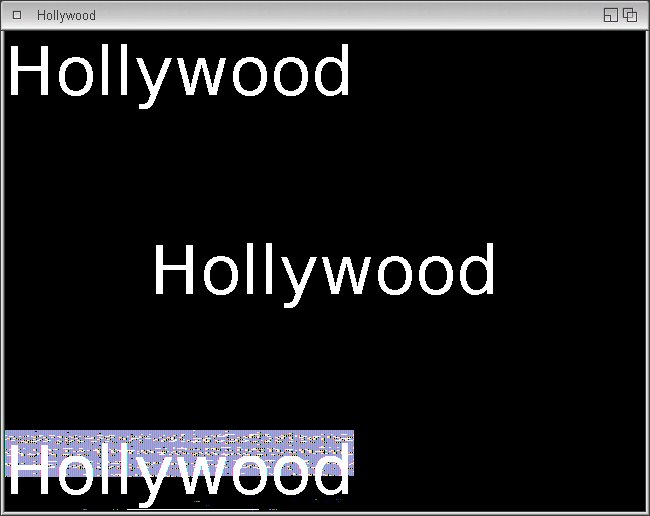
OS4.1FEU1 - Hollywood 7.1
Re: SaveBrush() - artefacts
Posted: Tue Jul 24, 2018 12:41 pm
by airsoftsoftwair
Confirmed. Will be fixed.
Re: SaveBrush() - artefacts
Posted: Tue Jul 24, 2018 7:21 pm
by lazi
Thanks in advance!
Until then a workaround like this helps to save brush 1:
Code: Select all
x = CopyBrush(1,Nil)
SelectBrush(x)
Cls
DisplayBrush(1,0,0)
EndSelect

SaveBrush(x,f$,#NIL,#IMGFMT_BMP);prefs.col_bg,#IMGFMT_BMP)
FreeBrush(x)
Re: SaveBrush() - artefacts
Posted: Sat Dec 01, 2018 9:57 pm
by airsoftsoftwair
Ok, this actually isn't a bug. For performance reasons, the text renderer doesn't clear the whole bitmap but just plots the text into the bitmap. Thus all pixels not containing text will just carry random data from memory but this will never be visible because those pixels are transparent. When you save a brush, however, those pixels will suddenly be visible of course.
SaveBrush(), however, has a "transcol" argument which can be used to set all invisible pixels to the color specified in that argument, so if you do the following there will be no more artefacts. Instead, all transparent pixels (which previously contained random data) will be set to black (0). I think the "transcol" argument was probably implemented for precisely this purpose

Code: Select all
SaveBrush(1,"ram:layer.bmp",0,#IMGFMT_BMP)
Re: SaveBrush() - artefacts
Posted: Wed Dec 05, 2018 4:31 pm
by evil
Well, but this is a bit annoying.
So it is not possible, to Save PNG-Pictures with Transparency at all??
At the moment, I am trying to create PDFs using Polybios, and am unable to get those images into the PDF. Thay always look very messed up.
It did not work when saving the brushes first and using
doc:LoadPNGImage() then, nor when importing them directly using doc:CrateImageFromBrush().
I also played around with
SelectBrush() using different combo-modes, Alphaintensity and
Cls()...
Nothing helped..
Any solution or workaround to solve this problem??
Re: SaveBrush() - artefacts
Posted: Thu Dec 06, 2018 10:30 am
by jPV
evil wrote: ↑Wed Dec 05, 2018 4:31 pm
So it is not possible, to Save PNG-Pictures with Transparency at all??
Hmm.. I don't quite get the issue by having this quick look at the thread, but at least I haven't had issues saving PNG images with RNOEffects, for example. There I either load existing PNG image with transparency or create a new image and draw into that before saving. I've created the new images like this: CreateBrush(1, 320, 240, #BLACK, {AlphaChannel = True, Clear = True})
Re: SaveBrush() - artefacts
Posted: Thu Dec 06, 2018 5:26 pm
by airsoftsoftwair
@evil: I think your issue is unrelated to this thread. jPV's problem is specifically related to the rather rare case of converting a text object (or text layer) to a brush. This is the only case in which the invisible pixels will contain junk because it is too expensive for Hollywood to always clear all memory first when drawing text.
If you have a problem embedding images in PDFs with Polybios, you might want to open a new thread and post code that demonstrates the issue.
Re: SaveBrush() - artefacts
Posted: Sun Dec 09, 2018 10:40 pm
by evil
I think, my problem is not that different.
I also get those artefacts when Creating Fonts.
I noticed similary artefacts in Brushes, if they were rotated.
And also I only notice those Artefacts, when I save the Brushes to disk or import them directly into Polybios.
I have a similary workaround for this, which gives them back their transparency...
Code: Select all
LoadBrush (1, "Pic which should get transparency back")
RotateBrush(1, 45)
CreateBrush(2, GetAttribute(#BRUSH, 1, #ATTRWITH), GetAttribute(#BRUSH, 1, #ATTRHEIGHT,anycolor)
SelectAlphaChannel(2)
SetAlphaIntensity(1)   <----Important. If Intensity is not zero, it will be saved to disk...
Cls()
EndSelect()

SelectBrush(2,#SELMODE_COMBO,1)
DisplayBrush(1, #CENTER, #CENTER)
EndSelect
SaveBrush(2, "TransparentPicture.png, #NOTRANSPARENCY, #IMGFMT_PNG)
A transparency of 1 is really not visible At least if you do not know the trick...
Maybe this helps someone...
Best regards
Evil
Re: SaveBrush() - artefacts
Posted: Mon Dec 10, 2018 6:34 pm
by airsoftsoftwair
I noticed similary artefacts in Brushes, if they were rotated.
Yes, that is true. When transforming brushes, Hollywood will not touch the pixels which are invisible anyway because that would decrease the performance. But as I said before, the "transcolor" argument of
SaveBrush() was specifically designed to solve this problem. It allows you to set all transparent areas to this specific color (e.g. black), thereby eliminating all random pixels in the image.
If that doesn't solve your problem, please post some code that illustrates your problem.
Re: SaveBrush() - artefacts
Posted: Tue Dec 11, 2018 12:21 am
by evil
Ok. Here is the Code:
Code: Select all
CreateBrush(1,200,100,#green)
RotateBrush(1,45)
SaveBrush(1,"ram:brush.png",#BLACK,#IMGFMT_PNG)
Afterwards I used your Polybios Example JPEG, Changed the Imagenames to "ram:brush.png" (both), and used the command LoadPNGImage() of course instead of LoadJPEGImage().
The PDF shows green, rotated Boxes with black Background. No Transparency there.
Also, If I display the picture with any Picture-viewer, they are not transparent at all.
I tested on OS3.9 (Amithlon) and on Ubuntu X64Linux.
On Both systems the same. No Transparency.
Thats why I used my workaround shown above.
Best regards
Evil